Object-Oriented Programming in JavaScript: Classes Explained Simply
Blueprints, objects, constructors, methods, and encapsulation with small examples
Imagine you are building a car showroom app. You need 100 cars, and each has a brand, a color, a speed, and actions like accelerate and brake. Writing 100 separate objects by hand would be slow and full of repeated code.
Classes solve this. You describe a car once (the blueprint), then create as many cars as you like from it. This guide explains Object-Oriented Programming (OOP), classes, constructors, methods, and the basic idea of encapsulation, using small examples (Car, Person, Student) and no advanced topics.
1. What is Object-Oriented Programming (OOP)?
OOP is a way of organizing code around objects. An object bundles two things together:
- Data (called properties): what the thing has. A car has a color.
- Behavior (called methods): what the thing does. A car can accelerate.
Instead of loose variables and functions scattered around, you keep related data and actions together in one place.
OOP is built on four big ideas:
| Idea | Simple meaning | In this post? |
|---|---|---|
| Classes and objects | Blueprints and the things made from them | Yes |
| Encapsulation | Keep data safe inside the object | Yes (the basics) |
| Inheritance | One class reuses another class | Next post |
| Polymorphism | Same method name, different behavior | Next post |
2. Real-world analogy: blueprint → objects
Think about how cars are made.
A car company creates one blueprint (a design). From that single blueprint, the factory builds many real cars. Every car follows the same design, but each has its own color, its own speed, and its own owner.
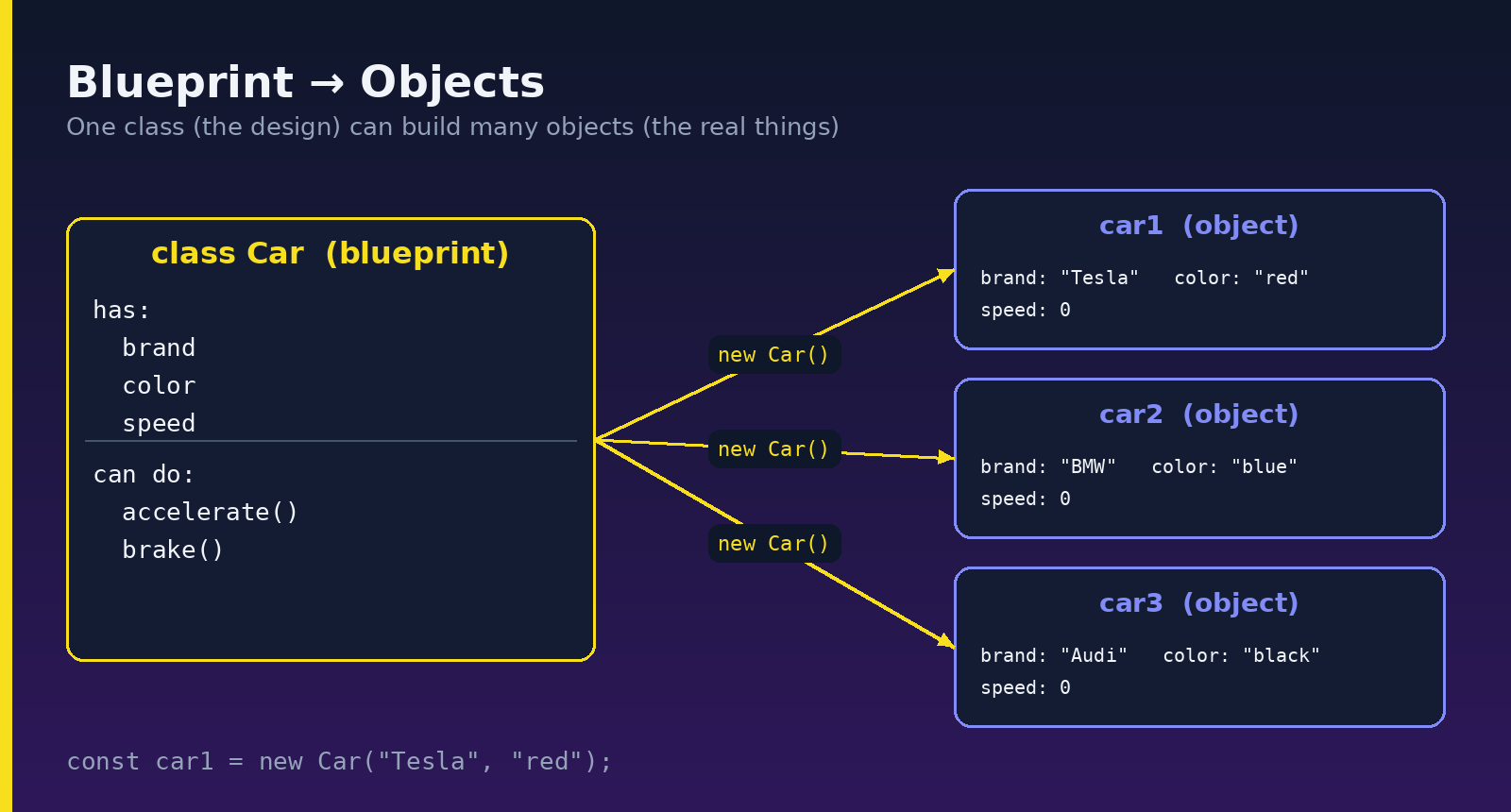
The blueprint is not a car. You cannot drive a blueprint. It only describes what a car is.
| Real world | JavaScript |
|---|---|
| Blueprint (design) | Class |
| A real car | Object (also called an instance) |
| Color, brand, speed | Properties |
| Drive, brake | Methods |
| Building a car from the blueprint | Creating an object with new |
3. The problem classes solve
Without classes, you copy and paste the same shape again and again:
const car1 = { brand: "Tesla", color: "red", speed: 0 };
const car2 = { brand: "BMW", color: "blue", speed: 0 };
const car3 = { brand: "Audi", color: "black", speed: 0 };
Now imagine adding an accelerate() function to each of them, then later renaming speed to currentSpeed. You would edit every object. With 100 cars, that is a mess.
With a class, you write the design once and reuse it. Change the class, and every new object follows the change. That is code reusability.
4. What is a class in JavaScript?
A class is a blueprint for creating objects. You write it with the class keyword.
class Car {
  // the blueprint goes here
}
The parts of a class:
| Part | What it is |
|---|---|
class |
The keyword that starts a class |
Car |
The class name. By convention, it starts with a capital letter (PascalCase) |
{ } |
The class body, where the constructor and methods live |
constructor |
A special method that sets up each new object |
| Methods | Functions that describe what the object can do |
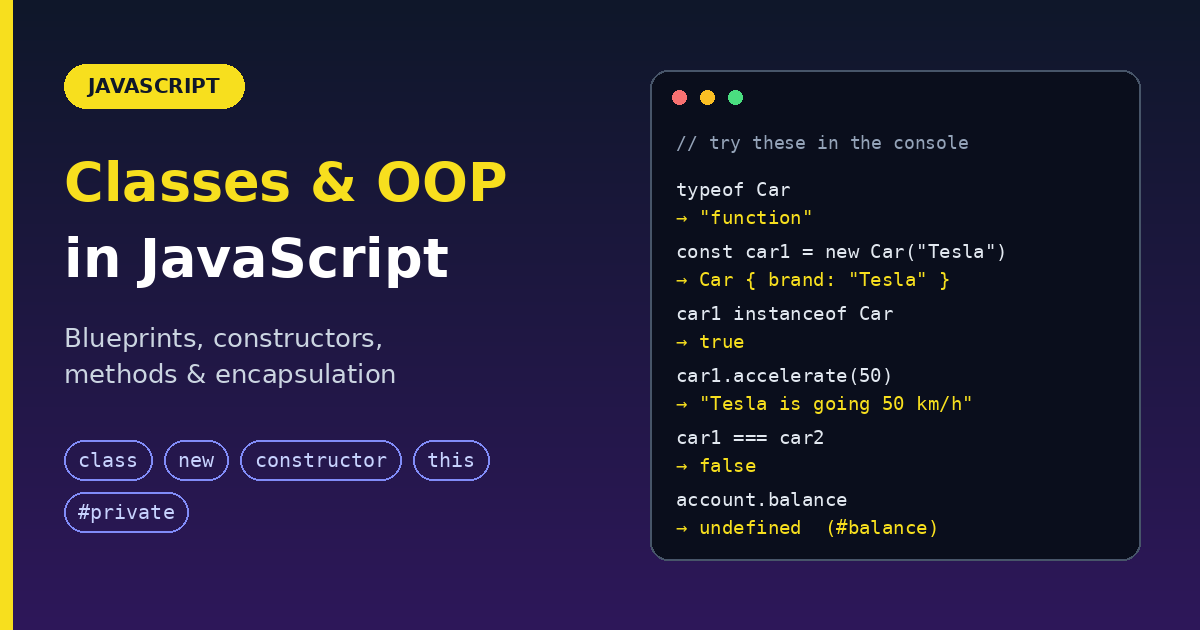
typeof Car; // "function" (a class is a special kind of function)
Important: a class by itself does nothing. It is only a blueprint. You need to create objects from it.
5. Creating objects from a class
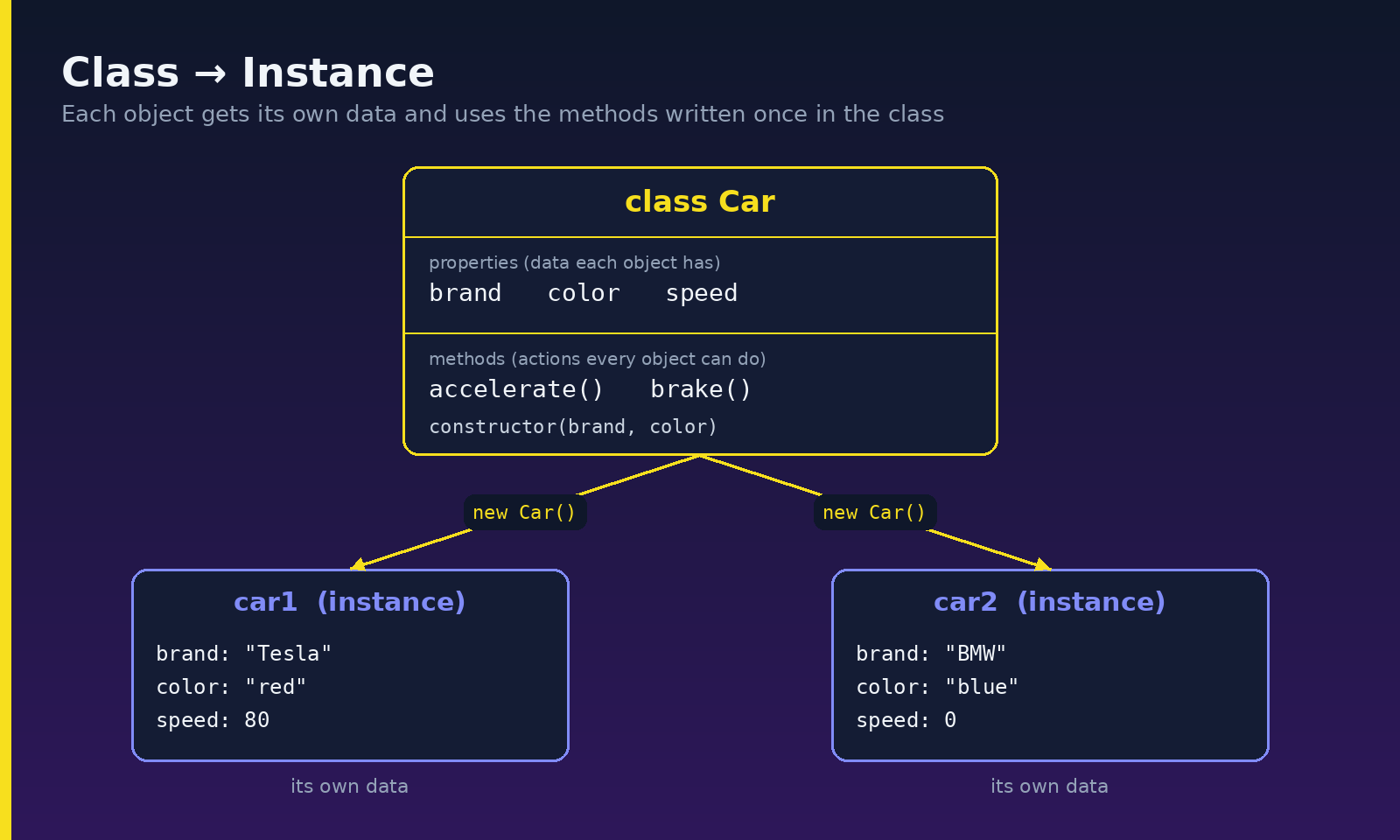
Use the new keyword to build an object from a class. The object you get is called an instance of the class.
class Car {
  constructor(brand, color) {
    this.brand = brand;
    this.color = color;
    this.speed = 0;
  }
}

const car1 = new Car("Tesla", "red");
const car2 = new Car("BMW", "blue");

console.log(car1);   // Car { brand: 'Tesla', color: 'red', speed: 0 }
console.log(car2);   // Car { brand: 'BMW', color: 'blue', speed: 0 }
Each object has its own copy of the data. Changing one does not affect the other.
car1.speed = 80;
console.log(car1.speed);   // 80
console.log(car2.speed);   // 0 (car2 is not affected)
Checking the relationship:
car1 instanceof Car;      // true  (car1 was made from Car)
car1.constructor === Car; // true
car1 === car2;            // false (two separate objects)
The class → instance relationship:
Gotcha: do not forget new.
const car3 = Car("Audi", "black");
// TypeError: Class constructor Car cannot be invoked without 'new'
6. The constructor method
The constructor is a special method that runs automatically, once, every time you create an object with new. Its job is to set up the starting values.
class Person {
  constructor(name, age) {
    this.name = name;   // store the name on the new object
    this.age = age;     // store the age on the new object
  }
}

const sam = new Person("Sam", 20);
console.log(sam.name);   // "Sam"
console.log(sam.age);    // 20
What is this?
Inside the constructor, this means "the new object being created right now". Writing this.name = name means: "give this new object a property called name, and set it to the value that was passed in."
What new does, step by step
When you write new Person("Sam", 20), JavaScript roughly does this:
- Creates a new, empty object
- Points
thisat that object - Runs the constructor, which fills in the properties
- Returns the finished object
Default values
You can give parameters a default value in case none is passed.
class Car {
  constructor(brand, color = "white") {
    this.brand = brand;
    this.color = color;
    this.speed = 0;
  }
}

new Car("Tesla").color;          // "white" (default used)
new Car("Tesla", "red").color;   // "red"
Good to know
- A class can have only one
constructor. - If you do not write one, JavaScript gives you an empty one automatically.
- If you forget to pass an argument, that property is
undefined:
console.log(new Person()); // Person { name: undefined, age: undefined }
Gotcha: forgetting this.. Without it, you only change the parameter, not the object.
class Broken {
  constructor(name) {
    name = name;   // changes the parameter, not the object
  }
}

new Broken("Sam").name;   // undefined
7. Methods inside a class
Methods are functions inside a class. They describe what the object can do. Write them directly inside the class body, with no function keyword and no commas between them.
class Person {
  constructor(name, age) {
    this.name = name;
    this.age = age;
  }

  greet() {
    return `Hi, I'm ${this.name} and I'm ${this.age} years old.`;
  }

  haveBirthday() {
    this.age++;   // changes this object's data
  }
}

const sam = new Person("Sam", 20);

console.log(sam.greet());   // "Hi, I'm Sam and I'm 20 years old."
sam.haveBirthday();
console.log(sam.age);       // 21
console.log(sam.greet());   // "Hi, I'm Sam and I'm 21 years old."
this inside a method
Inside a method, this means "the object that called this method". When you write sam.greet(), this is sam. When you write ana.greet(), this is ana. The same code gives each object its own result.
The Car example with real actions
class Car {
  constructor(brand, color) {
    this.brand = brand;
    this.color = color;
    this.speed = 0;
  }

  accelerate(amount) {
    this.speed += amount;
    console.log(`${this.brand} is going ${this.speed} km/h`);
  }

  brake() {
    this.speed = 0;
    console.log(`${this.brand} has stopped`);
  }
}

const car1 = new Car("Tesla", "red");
const car2 = new Car("BMW", "blue");

car1.accelerate(50);   // Tesla is going 50 km/h
car1.accelerate(30);   // Tesla is going 80 km/h
car2.accelerate(20);   // BMW is going 20 km/h
car1.brake();          // Tesla has stopped
console.log(car2.speed);   // 20 (car2 is not affected)
Methods are shared, not copied
You write a method once in the class, and every object can use it. JavaScript does not make a new copy of the method for each object, which saves memory.
car1.accelerate === car2.accelerate; // true (the same function)
Methods can call other methods
Use this.methodName() to call another method of the same object.
class Person {
  constructor(name) { this.name = name; }

  getTitle() { return `Mr. ${this.name}`; }

  welcome() {
    return `Welcome, ${this.getTitle()}!`;   // calls another method
  }
}
Gotcha: a method loses this when you pull it out
const greet = sam.greet;
greet();
// TypeError: Cannot read properties of undefined (reading 'name')
The method is no longer attached to sam, so this is empty. This often happens when you pass a method as a callback, such as setTimeout(sam.greet, 1000). Two easy fixes:
const bound = sam.greet.bind(sam);   // fix 1: bind it to sam
bound();                             // "Hi, I'm Sam and I'm 21 years old."

setTimeout(() => sam.greet(), 1000); // fix 2: wrap the call in an arrow function
8. Reusability in action
This is the real power of a class: write once, create many.
class Student {
  constructor(name, age) {
    this.name = name;
    this.age = age;
  }

  printDetails() {
    console.log(`Name: ${this.name}, Age: ${this.age}`);
  }
}

const students = [
  new Student("Sam", 20),
  new Student("Ana", 19),
  new Student("Raj", 22),
];

students.forEach((student) => student.printDetails());
// Name: Sam, Age: 20
// Name: Ana, Age: 19
// Name: Raj, Age: 22
Need 1,000 students? Same class, same method. Want to add a course property? Change the class once, and every new student gets it.
9. Basic idea of encapsulation
Encapsulation means keeping an object's data safe inside it, and letting the outside world use that data only through approved methods.
Think of an ATM. You cannot reach into the machine and change your balance. You press buttons (deposit, withdraw), and the machine checks that your request makes sense first.
The problem: open data can be broken
class OpenAccount {
  constructor(balance) {
    this.balance = balance;
  }
}

const account = new OpenAccount(100);
account.balance = -5000;   // nothing stops this!
Anyone can set the balance to anything, even a nonsense value.
The fix: private fields with #
Put a # in front of a property name to make it private. It can only be used inside the class.
class BankAccount {
  #balance = 0;   // private: hidden from outside code

  constructor(owner, initial = 0) {
    this.owner = owner;            // public
    if (initial > 0) {
      this.#balance = initial;
    }
  }

  deposit(amount) {
    if (amount > 0) {            // check before changing
      this.#balance += amount;
    }
  }

  withdraw(amount) {
    if (amount > 0 && amount <= this.#balance) {
      this.#balance -= amount;
      return true;
    }
    return false;                // not enough money, or a bad amount
  }

  getBalance() {
    return this.#balance;
  }
}

const account = new BankAccount("Sam", 100);

account.deposit(50);
console.log(account.withdraw(500));   // false (not enough money)
console.log(account.getBalance());    // 150

account.deposit(-20);                 // ignored (invalid amount)
console.log(account.getBalance());    // 150

console.log(account.balance);         // undefined (cannot see it directly)
// console.log(account.#balance);     // SyntaxError: Private field '#balance'
//                                    // must be declared in an enclosing class
Private fields are also hidden when you print or copy the object:
console.log(account);                  // BankAccount { owner: 'Sam' }
console.log(JSON.stringify(account));  // {"owner":"Sam"}
The idea in a picture
   OUTSIDE CODE                         INSIDE THE OBJECT
                                 ┌──────────────────────────────┐
   account.deposit(50)  ───────▶ │  deposit()                   │
   account.withdraw(20) ───────▶ │  withdraw()                  │
   account.getBalance() ───────▶ │  getBalance()                │
                                 │                              │
                                 │   ┌──────────────────────┐   │
   account.#balance  ──── ✖ ───▶ │   │  #balance  (private) │   │
                                 │   └──────────────────────┘   │
                                 └──────────────────────────────┘
        only the methods can touch the private data
Why encapsulation helps
| Benefit | Meaning |
|---|---|
| Safety | Outside code cannot put the object into an invalid state |
| Control | Every change goes through a method that can check the value first |
| Flexibility | You can change how the data is stored inside without breaking the code that uses the class |
A note on the underscore _ convention
You may see code like this._balance. The underscore is only a hint to other developers: "please do not touch this." It does not protect anything. Anyone can still change account._balance. Use # when you want real privacy.
10. Practice assignment: build a Student class
Your task:
- Create a class called
Student - Add the properties
nameandage - Add a method that prints the student's details
- Create multiple student objects
Try it yourself first, then compare with this solution:
class Student {
  constructor(name, age) {
    this.name = name;
    this.age = age;
  }

  printDetails() {
    console.log(`Name: ${this.name}, Age: ${this.age}`);
  }
}

const student1 = new Student("Sam", 20);
const student2 = new Student("Ana", 19);
const student3 = new Student("Raj", 22);

student1.printDetails();   // Name: Sam, Age: 20
student2.printDetails();   // Name: Ana, Age: 19
student3.printDetails();   // Name: Raj, Age: 22
Bonus challenges:
- Add a
courseproperty and show it inprintDetails() - Add a method
isAdult()that returnstruewhen the age is 18 or more - Add a method
haveBirthday()that increases the age by 1 - Store the students in an array and print them all with a loop
- Make a private
#marksfield and addaddMarks(value)andgetAverage()methods
Common mistakes
| Mistake | What happens | Fix |
|---|---|---|
Forgetting new |
TypeError: Class constructor ... cannot be invoked without 'new' |
Write new Car(...) |
Forgetting this. in the constructor |
The property is undefined |
Write this.name = name |
| Putting commas between methods | SyntaxError: Unexpected token ',' |
Remove the commas |
| Using the class before it is defined | ReferenceError: Cannot access 'Car' before initialization |
Define the class first |
Writing function before a method |
SyntaxError |
Write greet() { } |
| Pulling a method out of its object | this becomes undefined |
Use .bind(obj) or an arrow wrapper |
| Starting a class name with lowercase | Works, but breaks the convention | Use Car, not car |
Reading account.#balance outside the class |
SyntaxError |
Use a method like getBalance() |
Quick reference
| Term | Meaning | Example |
|---|---|---|
| Class | The blueprint | class Car { } |
| Object/instance | A thing made from the class | const car1 = new Car(...) |
new |
Builds an object from a class | new Car("Tesla", "red") |
constructor |
Runs once to set up the object | constructor(brand) { ... } |
this |
The current object | this.brand = brand |
| Property | Data stored on the object | car1.color |
| Method | An action the object can do | car1.accelerate(50) |
| Private field | Data only the class can touch | #balance |
| Encapsulation | Keep data safe behind methods | getBalance() |
Wrap up
- OOP organizes code around objects that bundle data (properties) and actions (methods).
- A class is a blueprint. An object (instance) is a real thing made from it with
new. - The
constructorruns automatically and sets up each new object. Inside it,thismeans the new object. - Methods are written inside the class, shared by all objects, and use
thisto reach the object's own data. - Classes give you reusability: define once, create as many objects as you need.
- Encapsulation keeps data safe. Use
#privatefields and expose only the methods you want.
Next up: inheritance, where one class reuses and extends another (extends and super), plus static methods and getters.
Comments
Join the discussionNo comments yet. Be the first to comment.