JavaScript Arrays 101
Create, access, update, and loop through arrays with simple examples
Think about a shopping list. You do not write each item on a separate piece of paper. You write them all on one list, in order: milk, eggs, bread. An array is exactly that for your code: one place to keep many values, in order.
This guide covers what arrays are, how to create them, how to read and change items, how to find out how many items you have, and how to loop through them. It uses short, simple examples (fruits, marks, tasks) and no advanced methods.
1. What is an array, and why do we need it?
An array is a collection of values stored in order under one name. Each value is called an element (or item), and each element has a position number called an index.
The problem: one variable per value
Say you want to store three fruits. Without arrays, you need three variables:
const fruit1 = "Apple";
const fruit2 = "Banana";
const fruit3 = "Mango";
That is fine for three. Now imagine 100 fruits, or the marks of 500 students. You would need 500 variable names, and you could not easily:
- Loop through them
- Count how many you have
- Pass them all to a function together
The solution: one array
const fruits = ["Apple", "Banana", "Mango"];
One name, all the values, in order.
| Separate variables | Array | |
|---|---|---|
| Names to manage | One per value | One in total |
| Add a 4th item | Create a new variable | Add it to the list |
| Loop over everything | Not possible | Easy |
| Count the items | Count by hand | fruits.length |
| Pass to a function | Many arguments | One argument |
Everyday things that fit in an array
const fruits = ["Apple", "Banana", "Mango"];             // a list of fruits
const marks = [85, 92, 78, 90, 66];                      // marks of a student
const tasks = ["Buy milk", "Study JavaScript", "Walk"];  // a to-do list
2. How to create an array
Use square brackets [ ] with values separated by commas. This is called an array literal.
const fruits = ["Apple", "Banana", "Mango"];
console.log(fruits);   // [ 'Apple', 'Banana', 'Mango' ]
Other examples:
const empty = [];                        // an empty array (no items yet)
const numbers = [10, 20, 30, 40];        // numbers
const flags = [true, false, true];       // booleans
Arrays can hold any type, even a mix:
const mixed = ["Sam", 20, true, null, [1, 2]];
console.log(mixed.length);   // 5
It works, but in practice keep one kind of value per array (all fruits, all marks). It is easier to work with.
Check that something is an array:
typeof fruits;              // "object" (arrays are a kind of object)
Array.isArray(fruits);      // true
Picture of the array above:
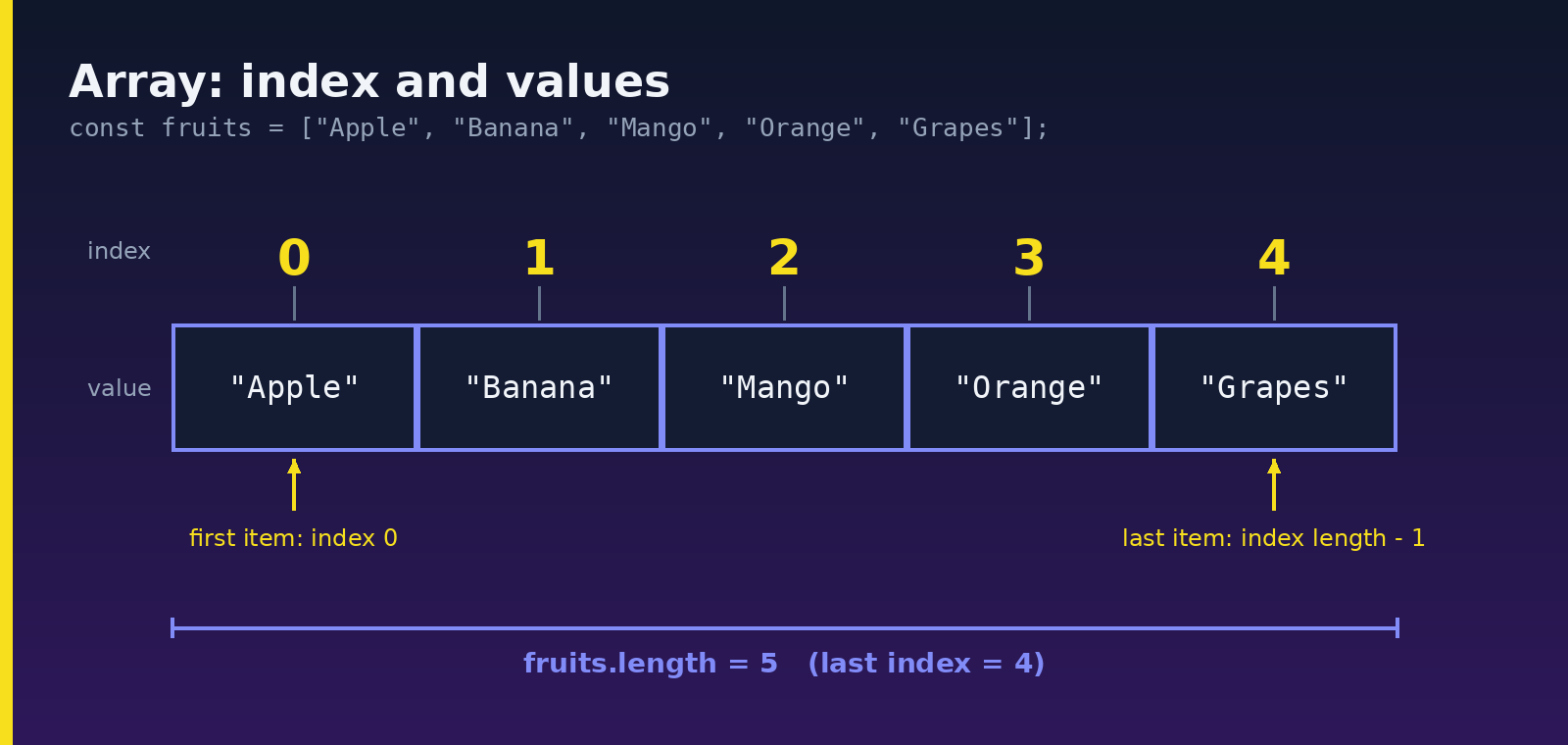
- Index: the position number (starts at
0) - Value: the item stored at that position
3. Accessing elements using an index
Use the array name with the index inside square brackets: arrayName[index].
const fruits = ["Apple", "Banana", "Mango"];

console.log(fruits[0]);   // "Apple"   (the first item)
console.log(fruits[1]);   // "Banana"
console.log(fruits[2]);   // "Mango"    (the last item)
Indexing starts from 0, not 1
This surprises almost every beginner. The first item is at index 0, the second at index 1, and so on.
Why 0? Think of the index as "how many steps from the start." The first item is 0 steps away from the start, the second is 1 step away, and so on. Memory-style picture:
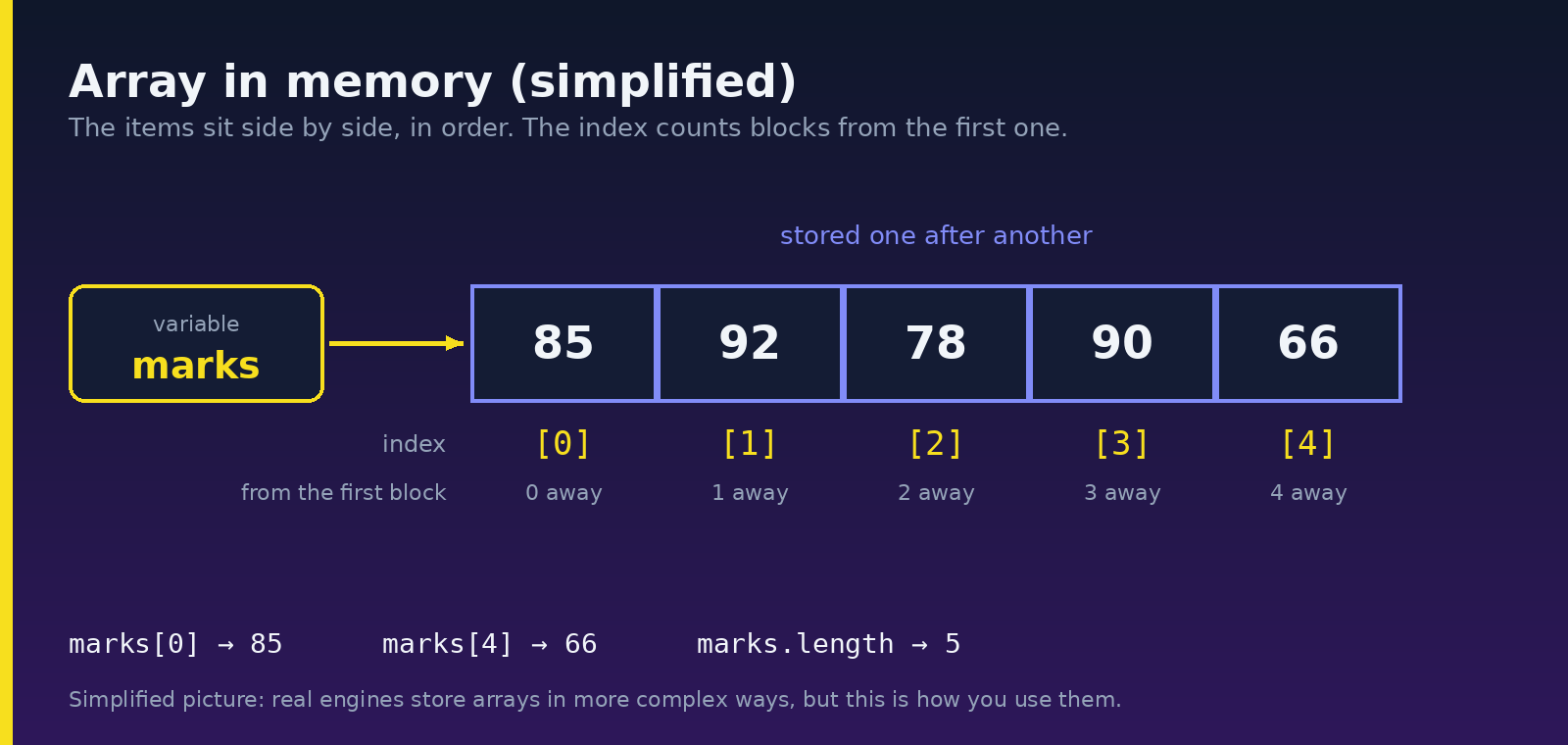
(This is a simplified picture. Real JavaScript engines store arrays in more complex ways, but the idea of "in order, counted from 0" is exactly how you use them.)
The last item
The last index is always one less than the length.
const marks = [85, 92, 78, 90, 66];

console.log(marks[0]);                  // 85 (first)
console.log(marks[4]);                  // 66 (last, because there are 5 items)
console.log(marks[marks.length - 1]);   // 66 (last, works for any size)
Using the values
Array items are normal values. Use them in expressions:
console.log(marks[0] + marks[1]); // 177
Gotchas
1. An index that does not exist gives undefined (no error).
console.log(marks[5]); // undefined (there is no 6th item)
2. Negative indexes do not count from the end (in this basic bracket form).
console.log(marks[-1]); // undefined
Use marks[marks.length - 1] for the last item.
4. Updating elements
Assign a new value to an index to replace the item there.
const fruits = ["Apple", "Banana", "Mango"];

fruits[1] = "Orange";
console.log(fruits);   // [ 'Apple', 'Orange', 'Mango' ]
Adding an item at the end
Use the index right after the last one, which is the same as length.
fruits[fruits.length] = "Grapes";
console.log(fruits);          // [ 'Apple', 'Orange', 'Mango', 'Grapes' ]
console.log(fruits.length);   // 4
(JavaScript also has a ready-made method for adding items. You will learn it in the next article.)
const does not lock the items
const only stops you from pointing the variable at a different array. You can still change what is inside.
const fruits2 = ["Apple", "Banana"];

fruits2[0] = "Mango";   // allowed: changing an item
// fruits2 = [];        // TypeError: Assignment to constant variable.
Gotcha: do not skip indexes
If you assign far past the end, JavaScript fills the gap with empty slots.
const a = ["x"];
a[3] = "y";

console.log(a);          // [ 'x', <2 empty items>, 'y' ]
console.log(a.length);   // 4
Always add at array.length (the next free index), not at a random number.
5. The array length property
length tells you how many items are in the array.
const marks = [85, 92, 78, 90, 66];

console.log(marks.length);   // 5
console.log([].length);      // 0 (an empty array)
Length and last index:
| Array | length |
Last index (length - 1) |
|---|---|---|
["a", "b", "c"] |
3 |
2 |
[85, 92, 78, 90, 66] |
5 |
4 |
[] |
0 |
-1 (no items) |
length updates by itself when you add items:
const tasks = ["Buy milk", "Study JavaScript"];
console.log(tasks.length);   // 2

tasks[tasks.length] = "Walk";
console.log(tasks.length);   // 3
Gotcha: length is a property, not a method. Do not add parentheses.
marks.length;     // 5
marks.length();   // TypeError: marks.length is not a function
6. Basic looping over arrays
Looping means doing something for every item. Printing all your tasks, adding up all your marks, and checking every score are all loops.
The classic for loop
const fruits = ["Apple", "Banana", "Mango"];

for (let i = 0; i < fruits.length; i++) {
  console.log(i, fruits[i]);
}
// 0 Apple
// 1 Banana
// 2 Mango
How it works:
| Part | Meaning |
|---|---|
let i = 0 |
Start at the first index |
i < fruits.length |
Keep going while i is a valid index |
i++ |
Move to the next index after each round |
fruits[i] |
The item at the current index |
Gotcha: the off-by-one mistake
Using <= instead of < goes one step too far:
for (let i = 0; i <= fruits.length; i++) {
  console.log(i, fruits[i]);
}
// 0 Apple
// 1 Banana
// 2 Mango
// 3 undefined   ← there is no index 3
Rule: the last valid index is length - 1, so use i < length.
The simpler for...of loop
When you only need the values (not the index), for...of is shorter and cleaner.
for (const fruit of fruits) {
  console.log(fruit);
}
// Apple
// Banana
// Mango
Which loop should I use?
| You need | Use |
|---|---|
| Just each value | for...of |
| The index too (numbering, positions) | for loop |
| To go backwards | for loop |
Going backwards:
for (let i = fruits.length - 1; i >= 0; i--) {
  console.log(fruits[i]);
}
// Mango
// Banana
// Apple
Real examples
Add up all marks and find the average:
const marks = [85, 92, 78, 90, 66];

let total = 0;
for (const mark of marks) {
  total += mark;
}

console.log(total);                  // 411
console.log(total / marks.length);   // 82.2
Find the highest mark:
let highest = marks[0];

for (const mark of marks) {
  if (mark > highest) {
    highest = mark;
  }
}

console.log(highest);   // 92
Practice assignment: favorite movies
Your task:
- Create an array of 5 favorite movies
- Print the first and last element
- Change one value and print the updated array
- Loop through the array and print all elements
Try it yourself first, then compare with this solution:
// 1. Create the array
const movies = ["Inception", "Interstellar", "The Dark Knight", "Dangal", "3 Idiots"];

// 2. First and last element
console.log(movies[0]);                    // Inception
console.log(movies[movies.length - 1]);    // 3 Idiots

// 3. Change one value and print the array
movies[1] = "The Matrix";
console.log(movies);
// [ 'Inception', 'The Matrix', 'The Dark Knight', 'Dangal', '3 Idiots' ]

// 4. Loop and print everything
for (const movie of movies) {
  console.log(movie);
}
// Inception
// The Matrix
// The Dark Knight
// Dangal
// 3 Idiots
Bonus challenges:
- Print the movies with numbers:
1. Inception,2. The Matrix, and so on - Print how many movies are in the list
- Change the last movie, then print the array again
- Print the movies in reverse order
- Make an array of 5 marks and print the total and average
Common mistakes
| Mistake | What happens | Fix |
|---|---|---|
Thinking the first item is index 1 |
Off by one: you get the wrong item | The first index is 0 |
arr[arr.length] to read the last item |
undefined |
Use arr[arr.length - 1] |
i <= arr.length in a loop |
An extra round with undefined |
Use i < arr.length |
arr.length() |
TypeError |
Write arr.length (no parentheses) |
arr[-1] for the last item |
undefined |
Use arr[arr.length - 1] |
Assigning far past the end (arr[10] = x) |
Empty slots appear | Add at arr.length |
Expecting const to freeze the items |
Items can still change | Only reassigning the variable is blocked |
Using for...in on an array |
You get indexes as text ("0", "1") |
Use for...of or a for loop |
Quick reference
| Task | Code | Result |
|---|---|---|
| Create | const a = [10, 20, 30]; |
An array of 3 items |
| Read the first item | a[0] |
10 |
| Read the last item | a[a.length - 1] |
30 |
| Update | a[1] = 25; |
[10, 25, 30] |
| Add at the end | a[a.length] = 40; |
[10, 25, 30, 40] |
| Count items | a.length |
4 |
| Loop over values | for (const x of a) { } |
Each value |
| Loop with index | for (let i = 0; i < a.length; i++) { } |
Each index |
Wrap up
- An array stores many values in order under one name, so you do not need a variable for each value.
- Create one with
[ ]. Read and update items witharray[index]. - Indexes start at 0. The last index is
length - 1. lengthis a property (no parentheses) and updates by itself.- Loop with a
forloop (when you need the index) orfor...of(when you only need the values). - Watch for the classic mistakes: off-by-one in loops,
undefinedfor missing indexes, and skipping indexes.
Next up: array methods such as push, pop, map, and filter, which make adding, removing, and transforming items much easier.
Comments
Join the discussionNo comments yet. Be the first to comment.